> For the complete documentation index, see [llms.txt](https://docs.aqua-cloud.io/documentation/llms.txt). Markdown versions of documentation pages are available by appending `.md` to page URLs; this page is available as [Markdown](https://docs.aqua-cloud.io/documentation/aqua-intelligence/enable-and-manage-aqua-intelligence-options.md).
# Enable and manage aqua Intelligence options
Effortlessly enable and customize aqua Intelligence features in aqua to streamline your testing and project workflows. Quick setup guidance for optimal productivity.
{% hint style="warning" %}
**Upcoming change to aqua Intelligence settings**
In one of the upcoming releases, we plan to simplify the way aqua Intelligence is managed. Instead of configuring each feature individually, the Server Administrator will be able to enable or disable aqua Intelligence as a whole.
* **What does this mean for you?**\
If some aqua Intelligence features were previously disabled in your environment, they will be automatically turned on and available once the setting is enabled.
* **Why are we making this change?**\
This update allows us to introduce new exciting aqua Intelligence capabilities across different areas of aqua more smoothly and consistently, without requiring manual setup each time.
{% endhint %}
aqua Intelligence empowers users with AI-driven capabilities such as generating project documents, creating test cases, and improving content, get instant answers to the questions and much more.
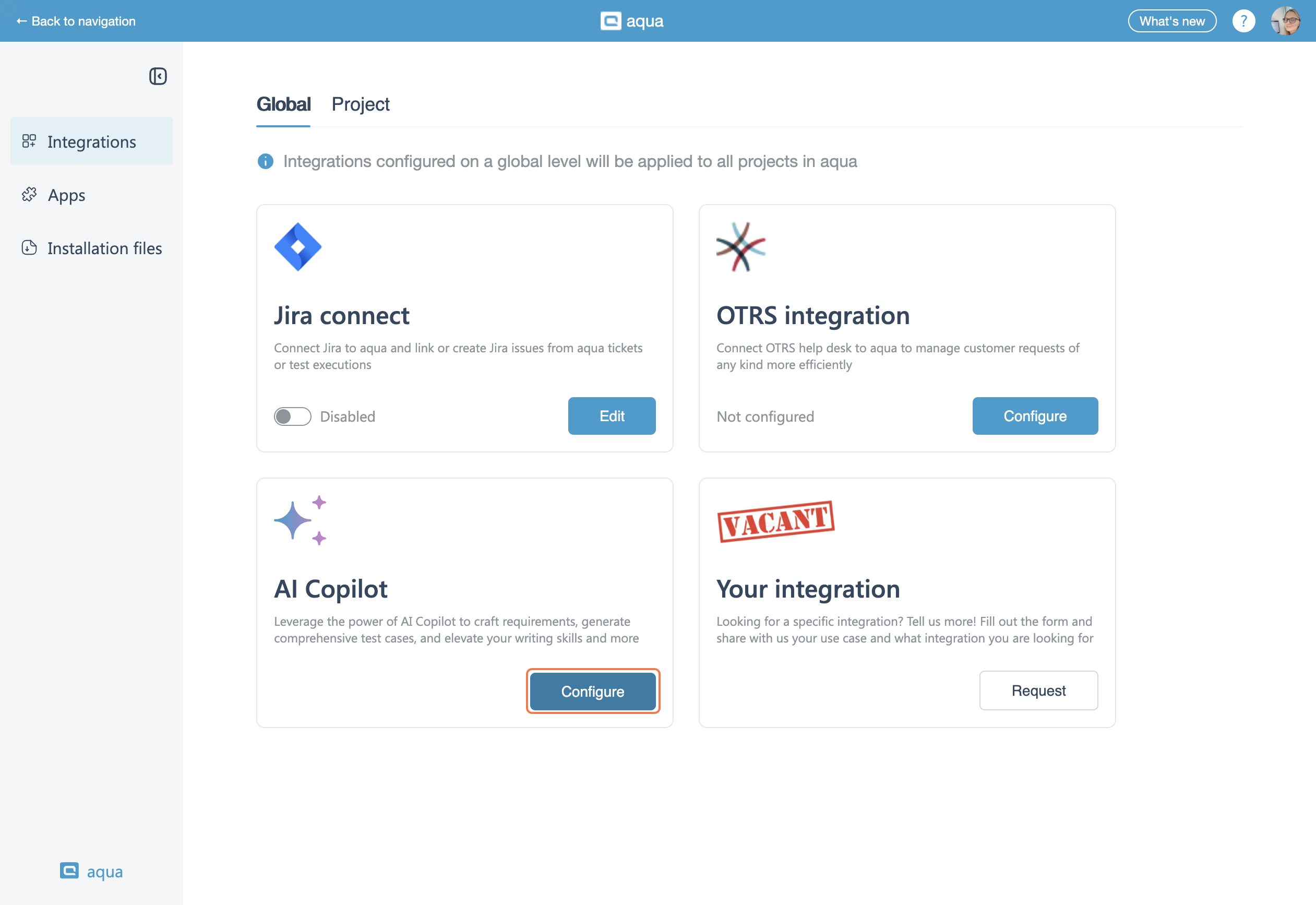
To enable the features, first log in to aqua with **Server Administrator** credentials. In the left-hand navigation panel, click **Integrations**.
Locate **aqua Intelligence** in the list of available integrations. Click the **Configure** button under aqua Intelligence.
Select specific AI-powered functionalities:
* AI Chat Assistant
* Content improvement tool in the editor
* Generate project documents (user stories, PRDs, BDDs) with file-based AI support
* Create test cases (with options for AI-generated descriptions and file-based AI support)
* Generate test data
Once enabling/disabling features, click on the 'Save' button to apply all changes.
Once enabled, aqua Intelligence will be active for **all projects globally**.
All environment users can access AI-powered features based on set configuration and permissions granted by the server administrator.
{% hint style="info" %}
Before proceed, please note:
* This functionality operates **only at the global level** and cannot be configured per project.
* aqua Intelligence features can **only be enabled or disabled by a Server Administrator**.
{% endhint %}
If aqua Intelligence is not enabled for private cloud users, they will see the following screen.
To grant the access to aqua Intelligence features for private cloud users, first you need to contact your dedicated CS manager or our support at **.**
---
# Agent Instructions
This documentation is published with GitBook. GitBook is the documentation platform designed so that both humans and AI agents can read, navigate, and reason over technical content effectively. Learn more at gitbook.com.
## Querying This Documentation
If you need additional information that is not directly available in this page, you can query the documentation by asking a question.
Perform an HTTP GET request on the following URL with the `ask` and `goal` query parameters:
```
GET https://docs.aqua-cloud.io/documentation/aqua-intelligence/enable-and-manage-aqua-intelligence-options.md?ask=&goal=
```
`ask` is the immediate question: it should be specific, self-contained, and written in natural language.
`goal` is what the user is ultimately trying to achieve, the reason they need the answer. Sharing it helps GitBook give you a better, more relevant answer. A goal is most helpful when it describes the outcome the user wants rather than restating the question. For example, with `ask=how do I create an API token`, a goal like `automate deployments from our CI pipeline` lets GitBook tailor the answer to that use case.
The response will contain a direct answer to the question and relevant excerpts and sources from the documentation.
Use this mechanism when the answer is not explicitly present in the current page, you need clarification or additional context, or you want to retrieve related documentation sections.

 * **What does this mean for you?**\
If some aqua Intelligence features were previously disabled in your environment, they will be automatically turned on and available once the setting is enabled.
* **Why are we making this change?**\
This update allows us to introduce new exciting aqua Intelligence capabilities across different areas of aqua more smoothly and consistently, without requiring manual setup each time.
{% endhint %}
aqua Intelligence empowers users with AI-driven capabilities such as generating project documents, creating test cases, and improving content, get instant answers to the questions and much more.
To enable the features, first log in to aqua with **Server Administrator** credentials. In the left-hand navigation panel, click **Integrations**.
* **What does this mean for you?**\
If some aqua Intelligence features were previously disabled in your environment, they will be automatically turned on and available once the setting is enabled.
* **Why are we making this change?**\
This update allows us to introduce new exciting aqua Intelligence capabilities across different areas of aqua more smoothly and consistently, without requiring manual setup each time.
{% endhint %}
aqua Intelligence empowers users with AI-driven capabilities such as generating project documents, creating test cases, and improving content, get instant answers to the questions and much more.
To enable the features, first log in to aqua with **Server Administrator** credentials. In the left-hand navigation panel, click **Integrations**.