> For the complete documentation index, see [llms.txt](https://docs.aqua-cloud.io/documentation/llms.txt). Markdown versions of documentation pages are available by appending `.md` to page URLs; this page is available as [Markdown](https://docs.aqua-cloud.io/documentation/product-updates-for-on-premise-customers/product-updates/2024/24.71.0-on-premise.md).
# 24.71.0 - On Premise
Discover what's new in version 24.71.0 for on-premise deployments. Get details on recent updates, fixes, and improvements tailored for enterprise environments.
Version 24.71
Date: 16.08.2024
### New integration | Azure Devops Sync
**Key benefits it bring to you:**
**Improved collaboration and transparency:** Synchronizing tickets between aqua and Azure DevOps ensures that all team members are updated about the latest changes, enhancing collaboration and reducing miscommunication within the team.
**Efficient workflow management:** Seamless synchronization of items like requirements and defects minimizes manual updates and reduces errors, ensuring consistent and efficient workflows across both platforms.
**Detailed data handling:** The sync includes comprehensive synchronization of elements of requirements and defects such as titles, statuses, assigned users, descriptions, images, and files, ensuring accurate data transfer.
To learn how to use it, visit this [article](/documentation/integrations/azure-devops-sync.md).
### Improvement | Automatically add sub-requirements as dependencies to a parent requirement
From now on, whenever you create subrequirements, all newly created items will automatically be added as dependent items and displayed on the graph. This feature allows you to quickly find all dependent subrequirements from the grid view by clicking ‘Find Dependent’ and save a lot of time.
If you haven’t worked with the dependencies yet, read this [article](https://docs.aqua-cloud.io/documentation/items/general-item-capabilities/dependencies) where you can find all the tips and tricks.
### Update | Jira Plugin | Add compatibility with Jira Data Center up to Version 9.17.1
The aqua team made the needed updates and changes to the plugin required by Jira, so it has become compatible with the newest version of Jira Data Center.
To guarantee a smooth experience and optimal performance, we recommend uninstalling the old version and installing a newest one that can be obtained from [Jira Atlassian marketplace.](https://marketplace.atlassian.com/apps/1219704/aqua-test-management-automation?tab=overview\&hosting=datacenter)
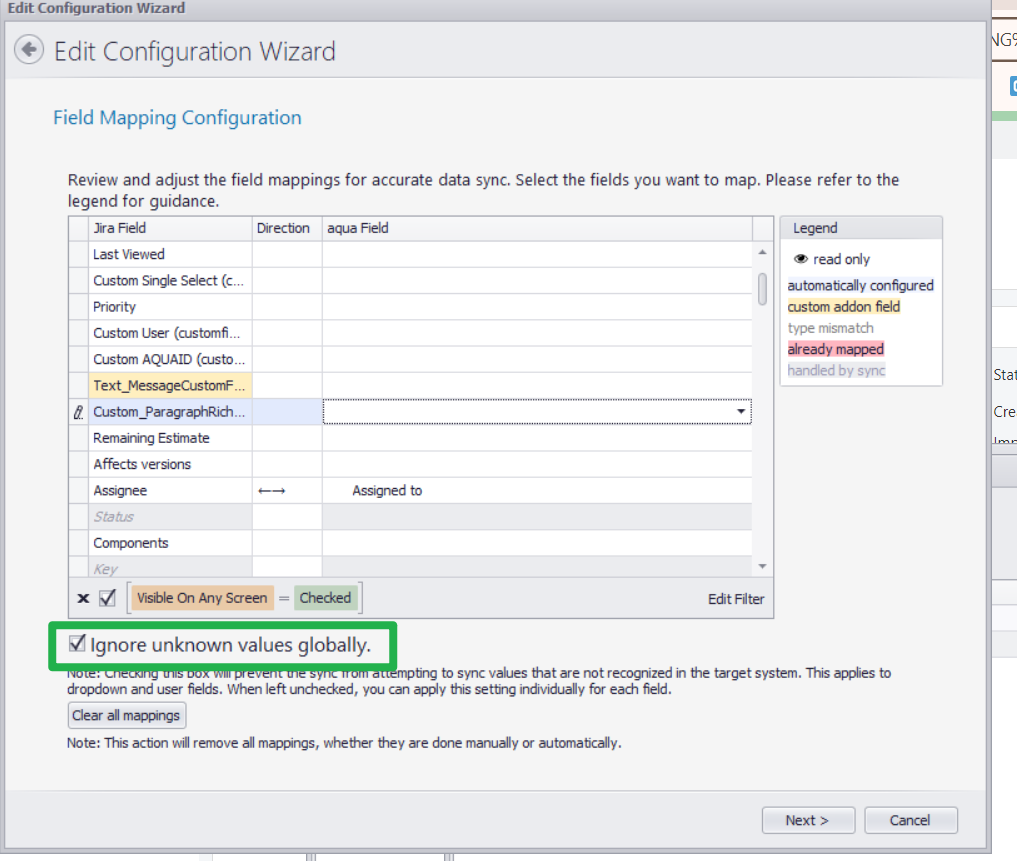
### Enhanced Jira Sync: selective value mapping for precise integration
Our latest enhancement to the aqua-Jira integration allows users to map only selected field values during synchronization. You now have control over which specific data points are transferred between both systems, ignoring non-essential values.
**Key benefits it bring to you:**
**Improved data precision**: Synchronize only relevant data, reducing clutter.
**Custom workflows**: Tailor syncs to fit your project needs without unnecessary fields.
**Efficiency**: Streamline updates by focusing on critical information.
This feature ensures your workflows are clean and aligned with project priorities.
For more details, [explore the full documentation](https://docs.aqua-cloud.io/documentation/integrations/jira-sync-synchronize-items-between-aqua-and-jira-projects/allow-mapping-of-only-selected-values-and-ignore-other-field-values-for-the-sync).
### Improvement | Agents and other aqua files are moved to the integrations page
We’ve streamlined the design and centralized all agents and other files under the new **Installation Files** page within the app. Users can now easily explore details about each agent and directly download them with one click. The updated layout improves accessibility and provides additional learning resources for each tool, enhancing your overall experience and efficiency in setting up integrations and automations.
Explore the new page today to access everything you need in one convenient location!
---
# Agent Instructions
This documentation is published with GitBook. GitBook is the documentation platform designed so that both humans and AI agents can read, navigate, and reason over technical content effectively. Learn more at gitbook.com.
## Querying This Documentation
If you need additional information that is not directly available in this page, you can query the documentation by asking a question.
Perform an HTTP GET request on the following URL with the `ask` and `goal` query parameters:
```
GET https://docs.aqua-cloud.io/documentation/product-updates-for-on-premise-customers/product-updates/2024/24.71.0-on-premise.md?ask=&goal=
```
`ask` is the immediate question: it should be specific, self-contained, and written in natural language.
`goal` is what the user is ultimately trying to achieve, the reason they need the answer. Sharing it helps GitBook give you a better, more relevant answer. A goal is most helpful when it describes the outcome the user wants rather than restating the question. For example, with `ask=how do I create an API token`, a goal like `automate deployments from our CI pipeline` lets GitBook tailor the answer to that use case.
The response will contain a direct answer to the question and relevant excerpts and sources from the documentation.
Use this mechanism when the answer is not explicitly present in the current page, you need clarification or additional context, or you want to retrieve related documentation sections.