> For the complete documentation index, see [llms.txt](https://docs.aqua-cloud.io/documentation/llms.txt). Markdown versions of documentation pages are available by appending `.md` to page URLs; this page is available as [Markdown](https://docs.aqua-cloud.io/documentation/product-updates-for-on-premise-customers/product-updates/2024/24.83.0-on-premise.md).
# 24.83.0 - On Premise
Stay updated with version 24.83.0 On Premise - find release highlights, enhancements, and fixes tailored for on-premise deployments in this detailed product update summary.
Version 24.83
Date: 06.09.2024
## **Copy or duplicate items with ease**
Streamline your workflow by copying items to a target project or duplicating them within the same project. The status of the ticket is reset automatically, ensuring that all copied or duplicated items start fresh, simplifying your project flow, and boosting efficiency. [Learn more](https://docs.aqua-cloud.io/documentation/items/general-item-capabilities/copy-item-to-a-target-project-or-duplicate-within-a-project).
## **Enhanced data security with masked inputs**
Capture sensitive data securely with masked input fields when creating captures. This ensures that confidential information remains hidden, enhancing data privacy and giving you peace of mind during your testing processes. [Learn more](https://docs.aqua-cloud.io/documentation/capture/masked-inputs-while-creating-captures).
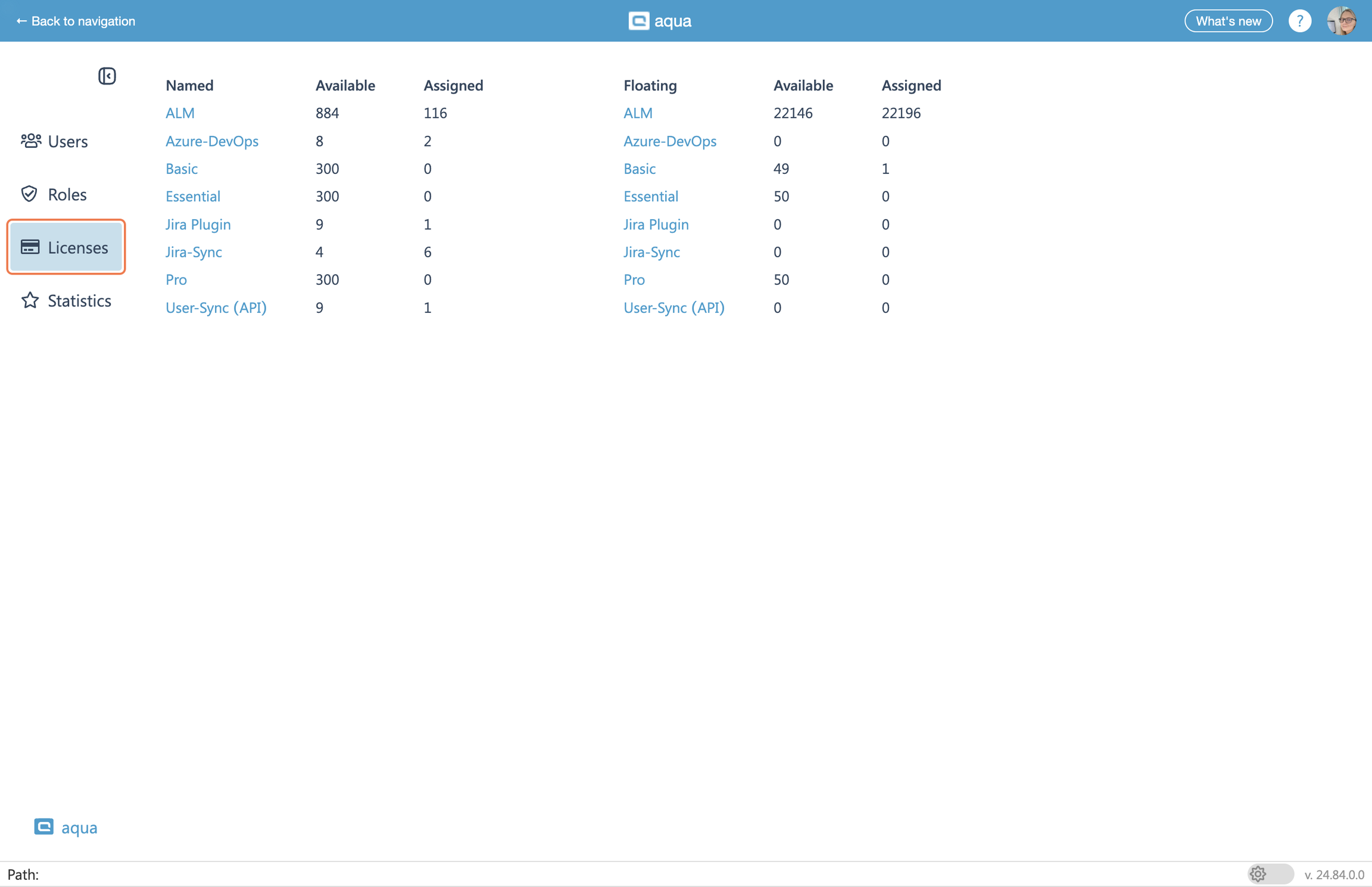
## **License usage statistics**
Gain full visibility into your license usage with our new statistics page. Administrators can now track assigned and available licenses and optimize their allocation, helping you keep it under control and manage costs effectively. [Learn more](https://docs.aqua-cloud.io/documentation/user-administration/licenses-statistics).
## **View test case descriptions during execution**
Testers can now view detailed test case descriptions directly during test execution, crucial for navigating complex sequences with multiple steps. This feature keeps testers informed about each program area, enhancing clarity and ensuring the testing process is smooth and comprehensible without cluttering individual test steps with excessive instructions.
Dive into these new features today and elevate your testing workflow!
{% hint style="success" %}
**Want to know what's coming next? Keep an eye out for updates, as we're currently working on exciting changes that will take your testing experience to the next level.**
{% endhint %}
---
# Agent Instructions
This documentation is published with GitBook. GitBook is the documentation platform designed so that both humans and AI agents can read, navigate, and reason over technical content effectively. Learn more at gitbook.com.
## Querying This Documentation
If you need additional information that is not directly available in this page, you can query the documentation by asking a question.
Perform an HTTP GET request on the following URL with the `ask` and `goal` query parameters:
```
GET https://docs.aqua-cloud.io/documentation/product-updates-for-on-premise-customers/product-updates/2024/24.83.0-on-premise.md?ask=&goal=
```
`ask` is the immediate question: it should be specific, self-contained, and written in natural language.
`goal` is what the user is ultimately trying to achieve, the reason they need the answer. Sharing it helps GitBook give you a better, more relevant answer. A goal is most helpful when it describes the outcome the user wants rather than restating the question. For example, with `ask=how do I create an API token`, a goal like `automate deployments from our CI pipeline` lets GitBook tailor the answer to that use case.
The response will contain a direct answer to the question and relevant excerpts and sources from the documentation.
Use this mechanism when the answer is not explicitly present in the current page, you need clarification or additional context, or you want to retrieve related documentation sections.