> For the complete documentation index, see [llms.txt](https://docs.aqua-cloud.io/documentation/llms.txt). Markdown versions of documentation pages are available by appending `.md` to page URLs; this page is available as [Markdown](https://docs.aqua-cloud.io/documentation/product-updates-for-public-and-private-clouds-customers/product-updates/2024/24.71.0-public-and-private-clouds.md).
# 24.71.0 - public and private clouds
Get details about the 24.71.0 update for public and private clouds, including feature enhancements and fixes tailored for cloud deployment environments.
Version 24.71
Date: 16.08.2024
### AI Copilot | Create user stories, BDDs or PRDs based on a file
We’re introducing a feature that lets you automatically generate user stories, BDDs, or PRDs directly from uploaded files such as images, excel sheets, or PDFs. This enhancement is designed to accelerate your documentation process by leveraging existing content and transforming it into actionable requirements in seconds. Simply upload your file, provide context, and select your desired document type.
With AI Copilot, quickly review, edit, and regenerate documents to ensure they meet your needs.
For more details, visit this [article](/documentation/aqua-intelligence/create-user-stories-bdds-or-prds-based-on-a-file.md).
### Enhanced Jira Sync: selective value mapping for precise integration
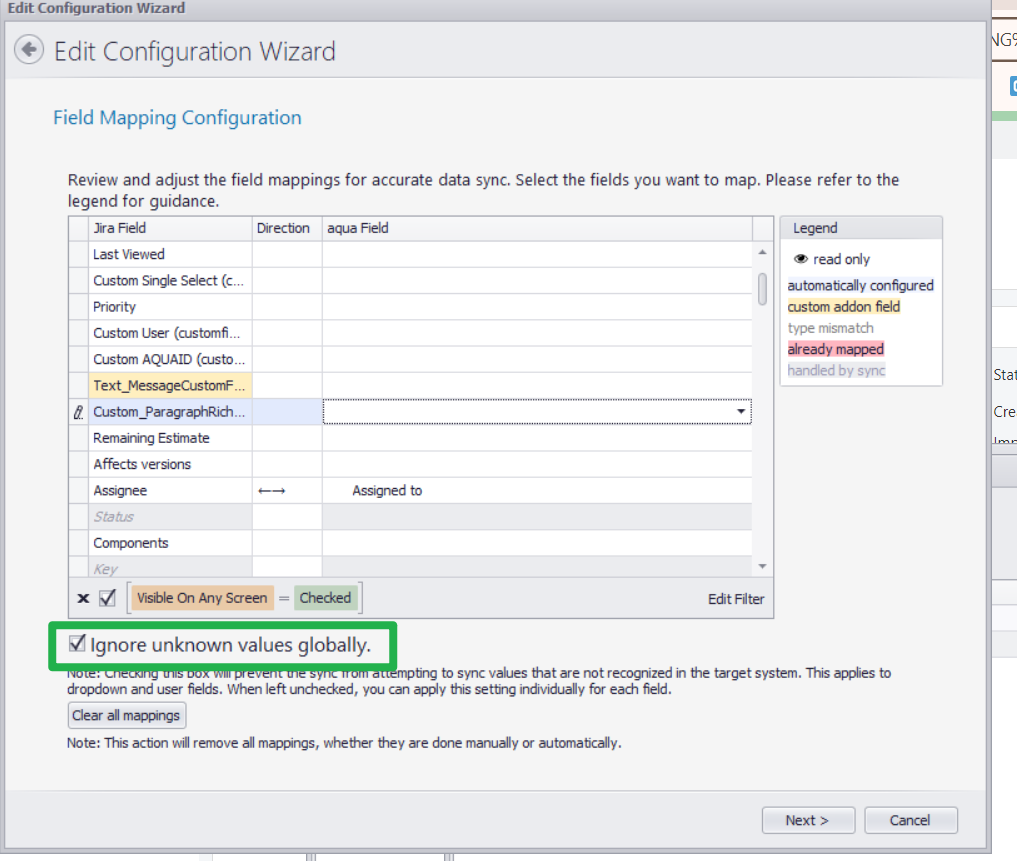
Our latest enhancement to the aqua-Jira integration allows users to map only selected field values during synchronization. You now have control over which specific data points are transferred between both systems, ignoring non-essential values.
**Key benefits:**
**Improved data precision**: Synchronize only relevant data, reducing clutter.
**Custom workflows**: Tailor syncs to fit your project needs without unnecessary fields.
**Efficiency**: Streamline updates by focusing on critical information.
This feature ensures your workflows are clean and aligned with project priorities.
For more details, [explore the full documentation](https://docs.aqua-cloud.io/documentation/integrations/jira-sync-synchronize-items-between-aqua-and-jira-projects/allow-mapping-of-only-selected-values-and-ignore-other-field-values-for-the-sync).
### Improvement | Agents and other aqua files are moved to the integrations page
We’ve streamlined the design and centralized all agents and other files under the new **Installation Files** page within the app. Users can now easily explore details about each agent and directly download them with one click. The updated layout improves accessibility and provides additional learning resources for each tool, enhancing your overall experience and efficiency in setting up integrations and automations.
Explore the new page today to access everything you need in one convenient location!
{% hint style="success" %}
**Want to know what's coming next? Keep an eye out for updates, as we're currently working on exciting changes that will take your testing experience to the next level.**
{% endhint %}
---
# Agent Instructions
This documentation is published with GitBook. GitBook is the documentation platform designed so that both humans and AI agents can read, navigate, and reason over technical content effectively. Learn more at gitbook.com.
## Querying This Documentation
If you need additional information that is not directly available in this page, you can query the documentation by asking a question.
Perform an HTTP GET request on the following URL with the `ask` and `goal` query parameters:
```
GET https://docs.aqua-cloud.io/documentation/product-updates-for-public-and-private-clouds-customers/product-updates/2024/24.71.0-public-and-private-clouds.md?ask=&goal=
```
`ask` is the immediate question: it should be specific, self-contained, and written in natural language.
`goal` is what the user is ultimately trying to achieve, the reason they need the answer. Sharing it helps GitBook give you a better, more relevant answer. A goal is most helpful when it describes the outcome the user wants rather than restating the question. For example, with `ask=how do I create an API token`, a goal like `automate deployments from our CI pipeline` lets GitBook tailor the answer to that use case.
The response will contain a direct answer to the question and relevant excerpts and sources from the documentation.
Use this mechanism when the answer is not explicitly present in the current page, you need clarification or additional context, or you want to retrieve related documentation sections.